Texture Exporter/Use it
Texture settings
Formats, scale, mipmaps, usage, codecs and quality, with what each one is for.
Every texture has its own settings. You change them in the Scene panel’s Details, or in the glTF export window’s sidebar; both edit the same settings. Apply to Selected (or Apply to… in the export window) copies them to other textures.
Format
| Format | glTF extension | Good for |
|---|---|---|
| KTX2 (default) | KHR_texture_basisu |
GPU-compressed with Basis Universal: textures stay compressed in GPU memory too, so you can use more of them. Transcoded in the browser to whatever the GPU supports. |
| WebP | EXT_texture_webp |
Small downloads that every current browser decodes. Lossy with a quality setting, or lossless. Decoded to full size in GPU memory. |
| AVIF | EXT_texture_avif |
Usually smaller than WebP at the same quality, but slower to decode. Always lossy. Writing it needs Blender 5.2. |
| PNG | glTF core | Lossless, for textures that need every pixel. Also the fallback if another format fails to encode. |
One scene can mix all four. Each texture is written as its own file next to the glTF, referenced by a relative URI.
Scale
1x, .5x, .25x, .125x or .0625x of the source size. KTX2 sizes are rounded to a multiple of 4, because Basis Universal works in 4×4 blocks.
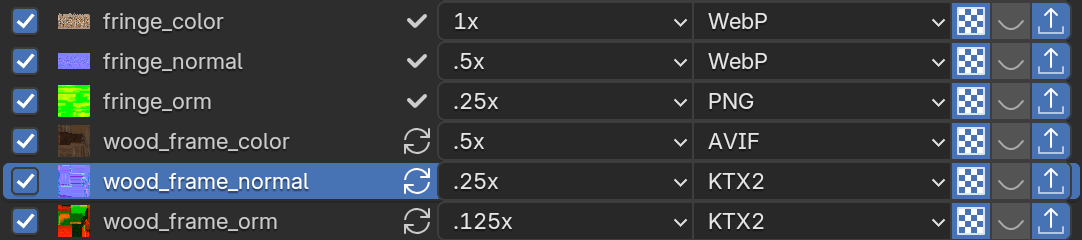
Scaling down is usually the biggest saving of all, for download size and GPU memory alike. Preview on Models shows what you lose.
Mipmaps
On by default. For KTX2, mipmaps are generated and stored in the file. For WebP, AVIF and PNG the browser generates them, and the setting only changes the glTF sampler.
Turn them off for textures that are always seen at full size (UI, sprites, a texture on a plane facing the camera). The add-on then writes a minFilter of LINEAR to the glTF, so three.js never tries to sample mipmaps that aren’t there (which renders KTX2 textures black).
Usage
What the texture holds. Auto detects it from the shader input it’s connected to, and is right almost every time.
| Usage | Meaning |
|---|---|
| Colour | sRGB colour: base colour, emission |
| Data | Linear non-colour data: roughness, metallic, occlusion, masks |
| Normal | A linear normal map |
Usage decides the colour space the file is written in, and which KTX2 codec Auto picks.
KTX2 settings
Codec
| Codec | Use for |
|---|---|
| Auto (default) | ETC1S for colour, UASTC for normal and data maps |
| ETC1S | Small files, lower quality. Good for most colour textures. |
| UASTC | High quality, larger files. Use for normal maps (ETC1S makes their shading blocky) and detailed data maps. |
ETC1S
| Setting | Default | What it does |
|---|---|---|
| Quality | 128 | 1–255. Higher is better quality and a larger file. |
| Effort | 1 | 0–6. Higher compresses better but encodes more slowly. The file size barely changes. |
UASTC
| Setting | Default | What it does |
|---|---|---|
| Quality | 2 | 0–4. Quality versus encoding speed. |
| RDO | On | Rate-distortion optimisation: much smaller files after Zstd, with a slight quality loss. |
| RDO Lambda | 1.0 | Lower is higher quality. Try 0.25 to 0.75 for normal maps. |
| Zstd | 18 | Zstandard supercompression level, 0–22. 0 turns it off. |
WebP and AVIF settings
| Setting | Default | What it does |
|---|---|---|
| WebP Quality | 85 | 1–99. Ignored with Lossless. |
| WebP Lossless | Off | Exact pixels, larger files. |
| AVIF Quality | 65 | 1–100. Always lossy (4:2:0): 100 is the highest quality, not lossless. About 70 matches WebP 85. |
Export
Untick Export on a texture to leave it out completely. It isn’t written, and the glTF leaves it out of its materials: there’s no fallback to the original image. Use it for textures you’ll load another way, or that three.js doesn’t need.
Checking the cost
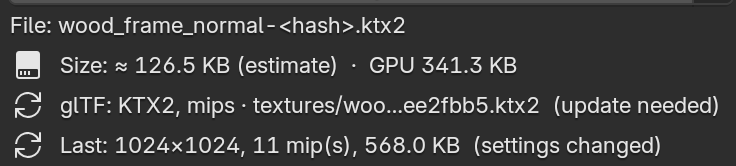
Details shows the estimated file size and GPU memory as you change settings, and the real size once the texture is exported. Estimates come from a model fitted on real textures; smooth gradients come out much smaller and photos somewhat larger.