Texture Exporter/Use it
Exporting with glTF
The Texture Export section in Blender's glTF exporter, and what changes in the files it writes.
Texture Exporter adds a section to Blender’s own glTF exporter, so the textures are encoded as part of an ordinary File ▸ Export ▸ glTF 2.0.
Turn it on
In the export window’s sidebar, tick the header of Texture Export (KTX2 / WebP / AVIF). It’s off by default, and the choice is saved with the scene in the .blend: tick it once and every later export of that scene uses it, including exports run by scripts or AI agents.
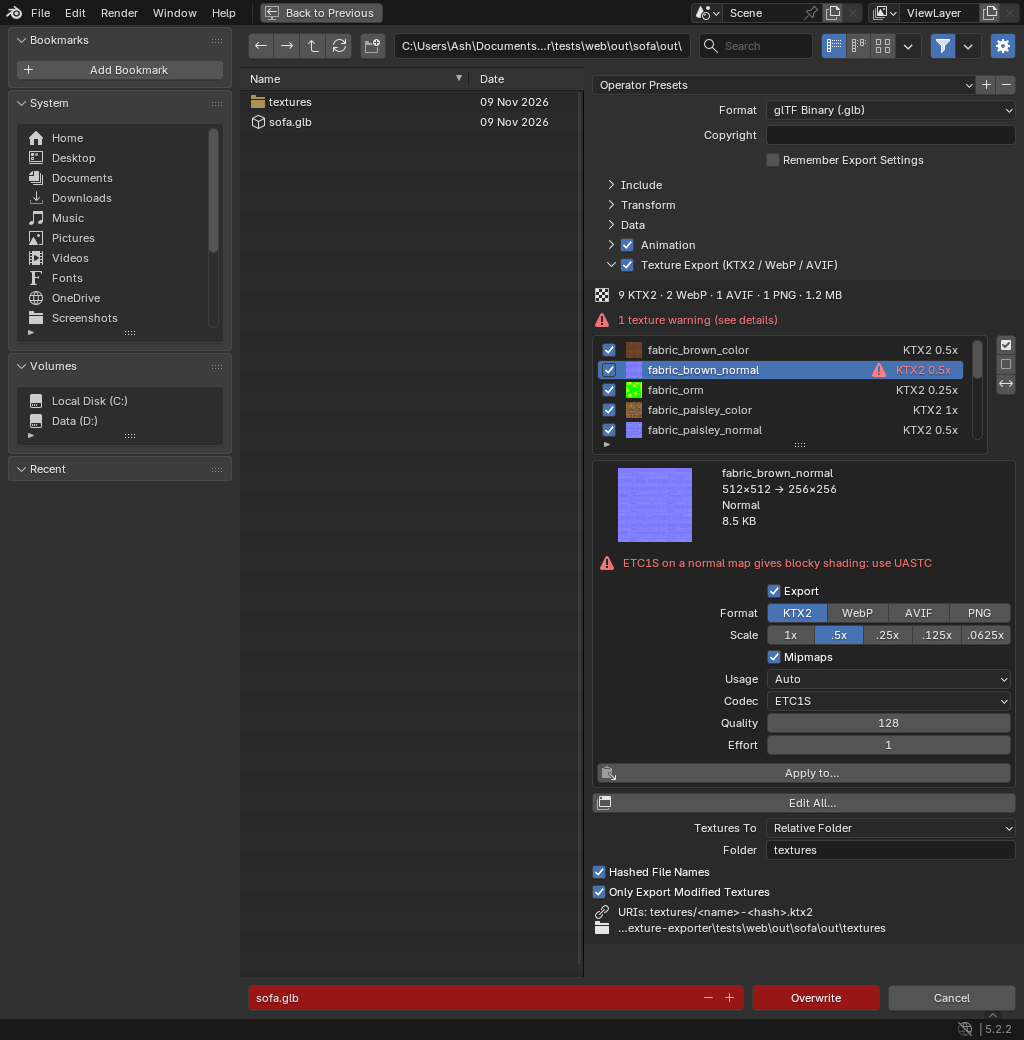
The section
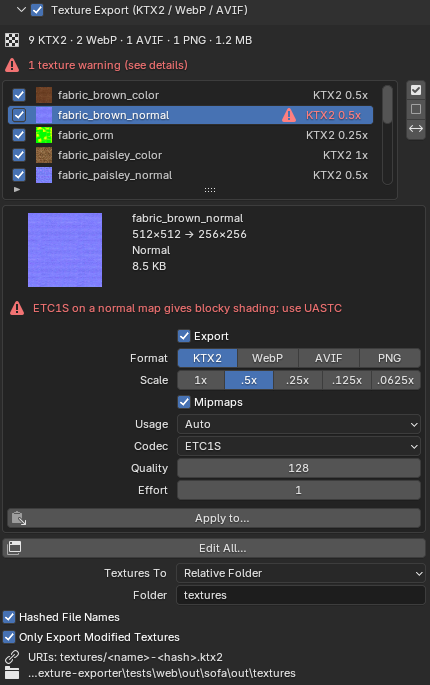
- The textures in this export. The list follows the exporter’s own Selected / Visible / Renderable / Active Collection options, so it shows exactly what this export includes.
- Each texture has a checkbox; the buttons beside the list tick all, none, or invert.
- An unticked texture isn’t exported at all. Its slot is removed from the glTF’s materials, with no fallback to the original image.
- Double-click a name to rename the exported file.
- Settings for the active texture: the same settings as the Scene panel.
- Apply to… copies the active texture’s settings to other textures in this export. A dialog lists them with checkboxes. Each texture keeps its export tick and file name.
- Edit All… opens a wide window with every texture’s settings side by side.
- Hashed File Names and Only Export Modified Textures, as in the Scene panel.
Textures To
| Option | Folder |
|---|---|
Relative Folder (default textures) |
A folder next to the exported file. .. goes up a level, e.g. ../textures. |
| Next to the File | The same folder as the .glb / .gltf. |
| Scene Panel Folder | Wherever the Scene panel exports to. It must be on the same drive, so the URI can stay relative. |
Below it the sidebar shows the URI prefix the glTF will use, and the absolute folder.
What the export writes
- Each texture is encoded (KTX2 encodes run in parallel), and the glTF references
<folder>/<name>.ktx2,.webp,.avifor.pngby a relative URI. The GLB itself holds only geometry, materials and animation. - Each texture gets its own sampler.
minFilterisLINEARwhen mipmaps are off. - If a texture fails to encode, it falls back to an external PNG, so the file stays valid.
- The add-on remembers the file as the last exported glTF, which the Scene panel’s status box and Update glTF use.
Exporter options that matter
- Images must be Automatic or any format except None. None exports no textures.
- Materials must be Export. With Placeholder, Viewport or No Export there are no textures, and the export doesn’t replace the last exported glTF. (Geometry-only GLBs written by other add-ons, such as Blender to TSL, don’t replace it either.) The section warns you when Materials isn’t Export.
- Draco and meshopt mesh compression (Data ▸ Mesh ▸ Compression) work as usual. They only change the geometry, and Update glTF leaves the compressed buffers untouched.
.glband.gltf+.binboth work.