Texture Exporter/Help
Bugs, requests and help
Report a bug from inside Blender, request a feature, and find answers to common problems.
Bug reports and feature requests go to the public ashthornton/tools-support repository on GitHub. You need a free GitHub account to post.
Report a bug from Blender
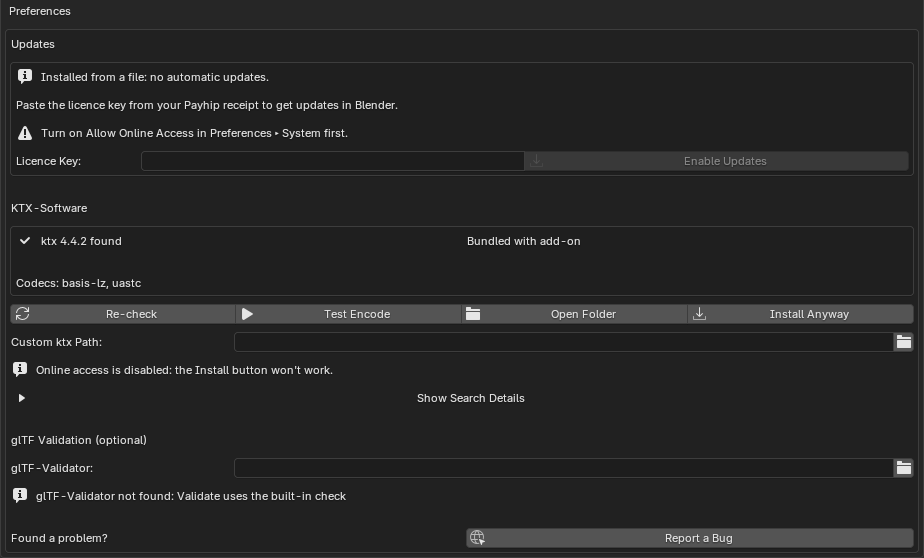
The quickest way is the Report a Bug button. It opens a new issue in your browser with the add-on, Blender, operating system and ktx versions filled in, plus details such as which codecs are available and whether online access is on.
It’s in two places:
-
Edit ▸ Preferences ▸ Add-ons ▸ Texture Exporter, at the bottom under Found a problem?
-
The link icon in the header of the Texture Export panel (Properties ▸ Scene).
Then describe what you expected and what happened instead. The most useful things to add:
- A small .blend that shows the problem, with its textures (or packed into it).
- The texture settings involved: format, codec, scale.
- Screenshots, and any errors from Blender’s Info editor or system console.
- For loading problems, the browser console output and your three.js version.
You can also open an issue on GitHub directly and pick the Texture Exporter bug form. Please search existing issues first; a 👍 on an existing one helps decide what gets fixed first.
Request a feature
Use the feature request form in the same repository and pick the add-on in its dropdown.
Common problems
The texture list is empty. The filters at the top (Visible, Selected, Renderable, Collection) may exclude every object. Turn them off to list the whole scene, and click refresh.
KTX2 export fails, or the preview shows a warning.
Open the add-on’s preferences and check the KTX-Software box. Use Test Encode, and if ktx isn’t found, see KTX-Software.
The GLB has no textures. Check that Texture Export is ticked in the glTF export window, that Images isn’t None, and that Materials is Export. See Exporter options that matter.
A KTX2 texture renders black in three.js.
Make sure the KTX2Loader is set on the GLTFLoader and its transcoder path is right. If the texture has no mipmaps, don’t change its minFilter. See Loading in three.js.
Textures 404 on the live site.
The textures/ folder (or your shared folder) has to be deployed with the GLB; the URIs are relative to it.
The status box says out of date, but I didn’t change anything. A texture was renamed, unticked, or had its format or mipmaps changed since the last export. The box lists each one. Use Update glTF.
I edited an image outside Blender and the export didn’t pick it up. Only Export Modified Textures compares settings, not pixels. Use Re-encode Selected.
Updates don’t work. See If updates don’t work.
Licence
The add-on is GPL-3.0-or-later, like Blender. The three.js helper scripts are MIT, so you can ship them in your own apps. The platform zips bundle KTX-Software (Apache-2.0), with its licence files included.