Texture Exporter/Use it
Sharing a texture folder
Export several .blend files into one texture folder, so GLBs share files and URLs, and clean up files nothing uses.
Several scenes (separate .blend files, each with its own GLB) can export into one texture folder. Textures they have in common are then stored once, downloaded once and, with the three.js plugin, uploaded to the GPU once.
Set it up
In every .blend that shares the folder:
- Point the textures at the same folder. For GLBs side by side in
models/, use Textures To../texturesin the glTF export window (and the same in the Scene panel’s Export To). - Turn on Hashed File Names, in the Scene panel under the folder and in the export window.
Files are then named <image>-<hash>.ktx2 (or .webp, .avif, .png), with the hash taken from the source pixels and the texture’s settings:
- The same image with the same settings gives the same name from any .blend, so every GLB that uses it references one file and one URL.
- Two different images that share a name (
albedoin both files) get different names, so they never overwrite each other. - A file’s content never changes under its name, so your server can cache the folder forever:
Cache-Control: public, max-age=31536000, immutable. - Changing a texture in one .blend writes a new file. Update glTF points that .blend’s GLB at it, and the other scenes keep the file they use.
The folder manifest
Each texture folder gets a .texture-exporter.json, listing the glTFs exported into it and the files the add-on wrote there. Leave it in place; it’s what lets the add-on tell its own files from yours. three.js never reads it.
Clean Up
When the folder holds files that no glTF uses any more, a line under the folder says how many, e.g. 2 unused files in the folder. The check runs in the background whenever the folder, the manifest or a listed glTF changes, and every 30 seconds while the panel is open.
Clean Up (the brush button next to the folder, and in the glTF status box) lists those files, then either moves them to _unused/ inside the folder or deletes them:
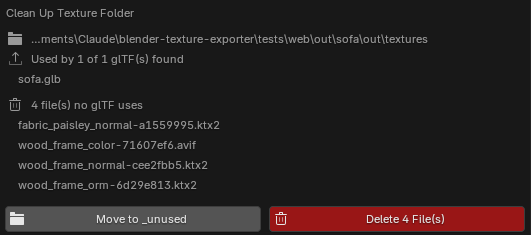
How it decides what’s unused:
- It reads every glTF listed in the manifest, from any .blend, plus every
.gltf/.glbit finds near the folder (its parent and the listed glTFs’ folders, three levels down). What the glTFs on disk reference is what counts. - Only files the add-on wrote are candidates. Your own files in the folder are left alone.
- If a glTF or the manifest can’t be read, nothing is moved.
- Just before acting it checks again, and only touches files that are still unused.